Plan your day and week with Claude and your to-do list
Connect Alcove's local MCP server to Claude Desktop or Claude Code, allow it to read only, and ask Claude to summarise today and suggest an order using each task's length. Once you trust its suggestions, allow Update so Claude can move what won't fit to tomorrow. Claude can't deliver reminders or see your calendar through Alcove, and the server runs only on the Mac.
A to-do list is good at holding everything and bad at telling you what to do first. That second part is where an assistant helps: it can look at today, the overdue pile and how long things take, and suggest a plan you can argue with. With the MCP server in Alcove: Tasks & Notes, Claude works from your real tasks rather than whatever you remember to paste in, and only with the access you give it.
About these prompts. They use the tools Alcove's MCP server has in version 1.0, unless marked "from version 1.1". Claude's answers vary from day to day and model to model, so treat each plan as a suggestion and check it before acting on it.
Before you start
- Turn on the server. In Alcove on the Mac, open Settings, choose MCP and turn on Local MCP server. It's off until you do.
- Add Alcove to Claude. In Claude Code, run
claude mcp add --scope user alcove -- /Applications/Alcove.app/Contents/MacOS/alcove-mcp(if Alcove is in your Applications folder; Copy MCP config shows the exact path). In Claude Desktop, choose Settings, then Developer, then Edit Config, add the snippet from Copy MCP config, and restart Claude. Connecting Claude to your to-do list has the details for each app. - Approve it, read only. Ask Claude anything about your tasks. Alcove lists it under Connected clients as waiting for your approval. Approve it, and it starts with read access only.
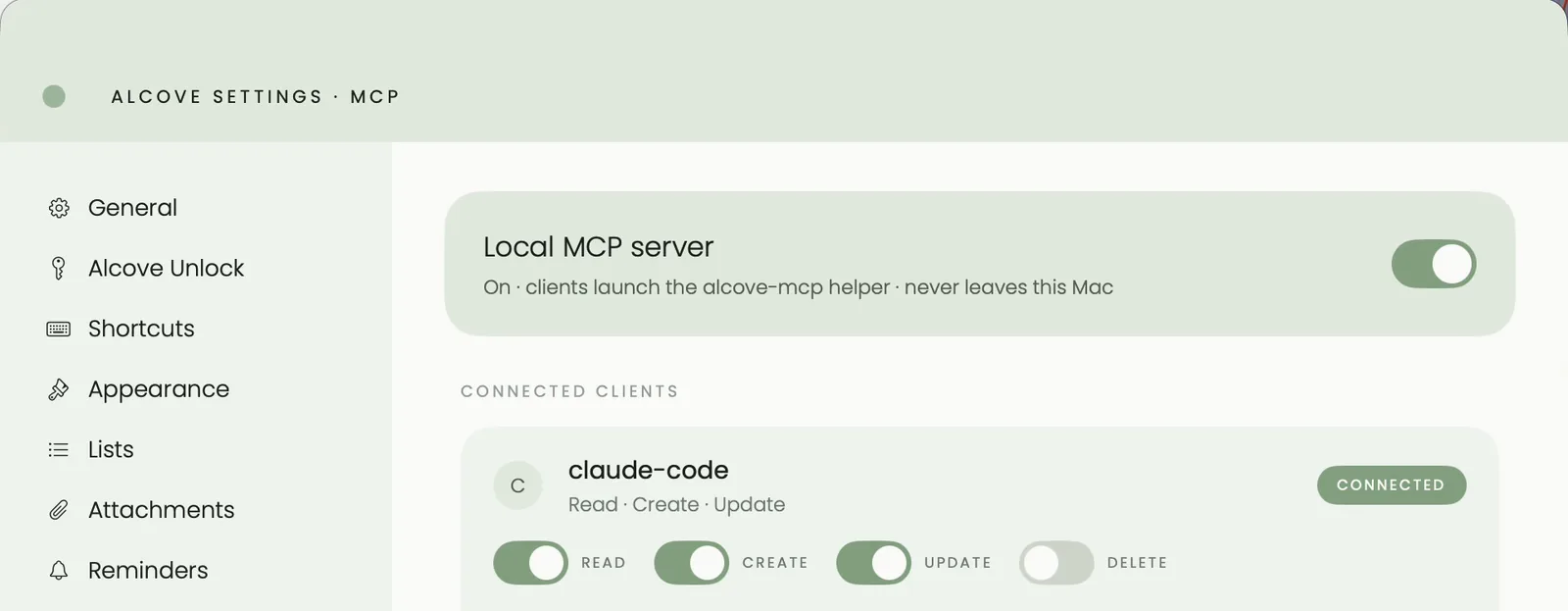
Start with Read for a few days. You'll see how Claude reads your list before it can change anything, and you can switch on Update or Create when a suggestion is worth acting on. Assistants work during the free trial and after you unlock Alcove; if the trial ends without the unlock, they pause until you do.
A morning plan
Give your tasks a length when you add them (quick add picks it out of the sentence), so Claude has something to add up. Then ask:
- "Summarise my day in Alcove: what's due today, what's overdue, and how long the tasks with a length add up to. Suggest an order, hardest first, and tell me what won't fit if I have six hours."
Claude reads today's and overdue tasks, each with its time, length, priority, list and tags. If you agree with what it says won't fit, and you've switched on Update:
- "Move the low-priority tasks that won't fit to tomorrow."
Then glance at Alcove's calendar before you start. Claude can give a task a start time, but it can't see the meetings already on your calendar. Alcove's Day view shows both on its hour grid, once your calendars are switched on in Alcove's settings, and you can drag tasks into the gaps; see time blocking. For the habit around all this, see how to plan your day.
Brain dump: through Claude, or Speak tasks?
Both turn a ramble into separate tasks. The difference is where the words go.
- Speak tasks stays with Apple. Your voice is transcribed on the device, Apple's on-device model (or Apple's Private Cloud Compute, for a long ramble on iOS 27 and macOS 27) splits it into tasks, and you check each card before adding. It works on iPhone, iPad and Mac. See speak your to-do list.
- Claude sends what you type to Anthropic as part of the conversation, under Anthropic's privacy policy. In return it can sort, rephrase and ask questions before adding anything. It needs Create.
A prompt for the Claude route:
- "Here's everything on my mind: [paste]. Turn it into Alcove tasks, one each, starting with a verb. Put work items in my Work list and the rest in Personal. Show me the list before you add anything."
A board stand-up (from version 1.1)
From version 1.1, Claude can read and move cards on your boards. Each card is a task, so it carries the date it last changed.
- "Show me my Launch board. What's in Doing, and which cards there haven't changed for a week?"
- With Update: "Move 'Draft the press kit' to Done." A card moved into a done column is completed, as it is when you drag it.
If you haven't set up a board yet, see a personal kanban board.
A weekly review with Claude
A review looks back; a plan looks forward. Claude is useful for the first half:
- "Help me review last week in Alcove. List what I finished in the past seven days, everything overdue, and what's due in the next seven days, grouped by list. Then ask me which three things matter most next week."
Then, with Create:
- "Add a task 'Plan the week' every Friday at 4pm, with a reminder at that time."
- "Make a note called 'This week' with my three priorities as a checklist."
The weekly review checklist covers what else belongs in a review, and planning your week covers the planning half. If you follow Getting Things Done, the same prompts fit its weekly review; see GTD on Mac and iPhone.
For developers: Claude Code and your code's TODOs
Claude Code can read your project and write to Alcove in the same session. With Read and Create allowed:
- "Find the TODO comments in this project and add each one to my Alcove list called App, with the file and line in the task's notes. Skip any that are already in that list."
- "Attach the surrounding code to each of those tasks as a snippet."
The tasks then sit in Alcove's menu bar and on your iPhone like any others.
What it can't do
- Deliver reminders. Alcove does that. Claude can set when a reminder goes off, and from version 1.1 whether it's quiet, a notification or an alarm.
- See your calendar. Alcove's server has no calendar tools. Do the final placing in Alcove's Day or Week view.
- Run on iPhone. The server runs on the Mac. Claude's phone app can't reach it, but what Claude changes on the Mac syncs to your iPhone and iPad.
- Connect to ChatGPT. ChatGPT and Claude on the web connect to MCP servers over the internet, and Alcove's has no internet address. For apps that do work there, see to-do apps that work with Claude.
Prompt library
| Prompt | Permission | Version |
|---|---|---|
| "Summarise my day in Alcove and suggest an order, using each task's length." | Read | 1.0 |
| "What's overdue, and which of it can I drop or move?" | Read | 1.0 |
| "Move the low-priority tasks that won't fit to tomorrow." | Update | 1.0 |
| "Turn this brain dump into Alcove tasks and show me the list before adding anything: [paste]" | Create | 1.0 |
| "What's due in the next seven days, grouped by list?" | Read | 1.0 |
| "List what I finished in the past seven days." | Read | 1.0 |
| "Add 'Plan the week' every Friday at 4pm, with a reminder." | Create | 1.0 |
| "Make a note called 'This week' with my three priorities as a checklist." | Create | 1.0 |
| "Show me my Launch board and the cards in Doing that haven't changed for a week." | Read | 1.1 |
| "Move 'Draft the press kit' to Done." | Update | 1.1 |
| "Add each TODO comment in this project to my App list, with the file and line in the notes." | Read and Create | 1.0 |
Sources
Checked in October 2026:
- Connect Claude Code to tools via MCP, Claude Code documentation
- Connect to local MCP servers, Model Context Protocol documentation
- Connecting Claude to your to-do list, with the permissions and the activity log
Questions people ask
Can Claude plan my day from my tasks?
Yes, once it can read them. With Alcove's MCP server connected and Read allowed, Claude can fetch today's and overdue tasks with their times, lengths, priorities and lists and suggest an order. It only changes anything if you also allow Update.
Can Claude add tasks to my to-do list?
Yes, with Create switched on for it in Alcove. It can add a task with a list, tags, a date and time, a length, a repeat and a reminder, and it creates the list or tag if it doesn't exist yet.
Can Claude see my calendar through Alcove?
No. Alcove's server works with tasks, lists, tags and notes (and boards from version 1.1), not calendar events. Claude can give a task a start time, so check its plan in Alcove's calendar, where your events sit beside your tasks.
Is it safe to give Claude delete access?
You rarely need to. Planning only needs Read, and moving or finishing tasks needs Update; with Delete off, Claude can't remove anything. Every request, including refused ones, appears in Alcove's activity log.
Does this work with ChatGPT or on iPhone?
No. Alcove's server runs on the Mac and is started by a local assistant app such as Claude Desktop or Claude Code, while ChatGPT and Claude's phone app connect to servers over the internet. What Claude changes on the Mac reaches your iPhone and iPad through iCloud.