To-do apps that work with Claude and other AI assistants
Todoist and TickTick run official remote MCP servers, so they work in Claude on the web, in the desktop app and on your phone, and in ChatGPT too. Claude's iPhone app can manage Apple Reminders directly. 2Do and Alcove ship local servers that run on your Mac, so they work with Claude's desktop app rather than its web and phone apps. Things 3 has no official connection, and Omni is still working on MCP for OmniFocus.
If you already use Claude, the obvious next step is letting it see your to-do list: "What's due this week?", "Move everything tagged #finance to Friday." Whether that works, and where, depends on how your to-do app connects. Some apps run a server on the internet that Claude signs in to; others run a small program on your Mac; a few rely on what other people have built.
How I compared. I make Alcove, one of the apps below, so read this with that in mind. I didn't install the other apps for this page; I checked each one's help documentation, App Store listing and pricing page, and Anthropic's and OpenAI's documentation, on 8 October 2026. Prices are US.
Three ways an assistant reaches your tasks
| Route | Where it runs | What you set up | Which Claude apps can use it |
|---|---|---|---|
| Remote connector (Todoist, TickTick) | On the app maker's servers; Claude connects from Anthropic's cloud | Sign in once from Claude's Connectors settings | Claude on the web, the desktop app and the phone apps, plus Claude Code |
| Local MCP server (2Do, Alcove, community servers) | A small program on your Mac that the assistant app starts | Add it to the assistant app's settings once | Claude's desktop app and Claude Code; not Claude on the web or the phone apps |
| Claude's iPhone app with Apple Reminders | In Claude's iPhone app, using Reminders on the phone | Allow Reminders access when Claude asks | Claude's iPhone app |
Anthropic's help explains the split: a remote connector is reached from Anthropic's cloud in every Claude app, while local servers set up in Claude's desktop app run on your computer and aren't available in Claude on the web or in Cowork. That one difference decides most of the table below.
The apps compared
| App | Official or community | Remote or local | Works in | Account for the connection | Price (US) |
|---|---|---|---|---|---|
| Todoist | Official, run by Doist | Remote | Claude on the web, desktop and phone; Claude Code; ChatGPT, Codex and Gemini Spark | Todoist account, approved by signing in | Free plan; Pro $60 a year or $7 a month ($59.99 or $6.99 in the App Store) |
| TickTick | Official | Remote | Claude; Claude Code; ChatGPT; Cursor, VS Code and other MCP apps | TickTick account, by signing in or with an API token | Free plan; Premium $49.99 a year or $4.99 a month |
| Apple Reminders | Built into Claude's iPhone app; community servers on the Mac | On the phone; local on the Mac | Claude's iPhone app; Claude's desktop app through community servers such as iMCP | Your Apple Account | Free |
| 2Do | Official | Local, as a Claude desktop extension | Claude's desktop app; other MCP apps through the same server | None | Mac $49.99 from 2doapp.com with 18 months of updates, or a subscription on the Mac App Store; iPhone $9.99, iPad $19.99 |
| Things 3 | Community only | Local | Claude's desktop app, Claude Code and similar, through third-party servers | Never your Things Cloud login | Mac $49.99, iPhone $9.99, iPad $19.99 |
| OmniFocus 4 | Community only; Omni is working on MCP | Local | Local MCP apps, through community servers | Depends on the server | $74.99 Standard or $149.99 Pro licence, or $99.99 a year |
| Microsoft To Do | Community only | Local, through Microsoft Graph | Claude's desktop app, Cursor and other local MCP apps | Microsoft account sign-in | Free |
| Alcove (I make it) | Official, built into the Mac app | Local | Claude's desktop app, Claude Code and other local MCP apps | None | $29.99 once for Mac, iPhone and iPad, after a 14-day free trial |
For more on what each app costs across all your devices, see to-do app prices compared.
Which should you pick?
- You use Claude on your phone or in a browser. Todoist or TickTick. Their remote servers are the only routes here that work in every Claude app, and both also work with ChatGPT. Your tasks live on their servers, and Claude reaches them through Anthropic's.
- You already live in Apple Reminders. Claude's iPhone app can add reminders, set due dates, priorities and notes, and manage repeating reminders in your existing lists. It can't create or edit the lists themselves. On the Mac you'd need a community server.
- You want the connection to stay on your Mac. 2Do or Alcove. Both run a local server that Claude's desktop app starts, with no relay of their own in between. 2Do is the more configurable of the two, with smart lists and focus filters; Alcove adds notes, boards and the Mac menu bar.
- You use Things 3 or OmniFocus and don't want to switch. A community server is the route for now. Cultured Code lists the safe methods to look for. For OmniFocus, Omni said in September 2026 that it is working towards MCP, so it may be worth waiting. See Alcove vs Things 3 and Alcove vs OmniFocus if you're weighing a switch.
What an assistant can and can't do with your tasks
Every server here lets an assistant read tasks, add them, change them and mark them done. Beyond that they differ:
- Todoist: tasks and projects, including rescheduling. Its help says Claude can't manage sections, labels, comments or filters through the connector, or assign tasks in shared projects. One tip from Todoist: ask Claude to "reschedule" a repeating task, because "change the date" removes the repeat.
- TickTick: tasks, lists, sections, tags, comments, habits, focus records and countdowns.
- 2Do: lists, tasks, projects, checklists and sub-tasks, alarms and repeats, and pausing tags. 2Do must be open on the Mac for it to work.
- Apple Reminders in Claude's iPhone app: reminders in existing lists, but not the lists.
- Alcove: tasks, lists, tags, notes and links between them, attachments and a day summary; from version 1.1, boards too.
What none of them do is remind you on their own. The to-do app delivers the reminder; the assistant can only set it, where the app's tools allow. And an assistant only sees what the server exposes: Alcove's server, for example, doesn't include your calendar events.
Privacy and permissions
With every option here, what the assistant reads becomes part of your conversation, and the assistant's provider (Anthropic, for Claude) handles it under its own privacy policy. Todoist, 2Do and Cultured Code all say so in their help pages. The routes differ in what else is involved:
- Remote: your tasks pass between the app maker's servers and Anthropic's. You approve access once, and you can usually revoke it from the app's settings; Todoist's is under Settings, Integrations.
- Local: the link between the app and the assistant stays on your Mac. The assistant still sends what it reads to its provider.
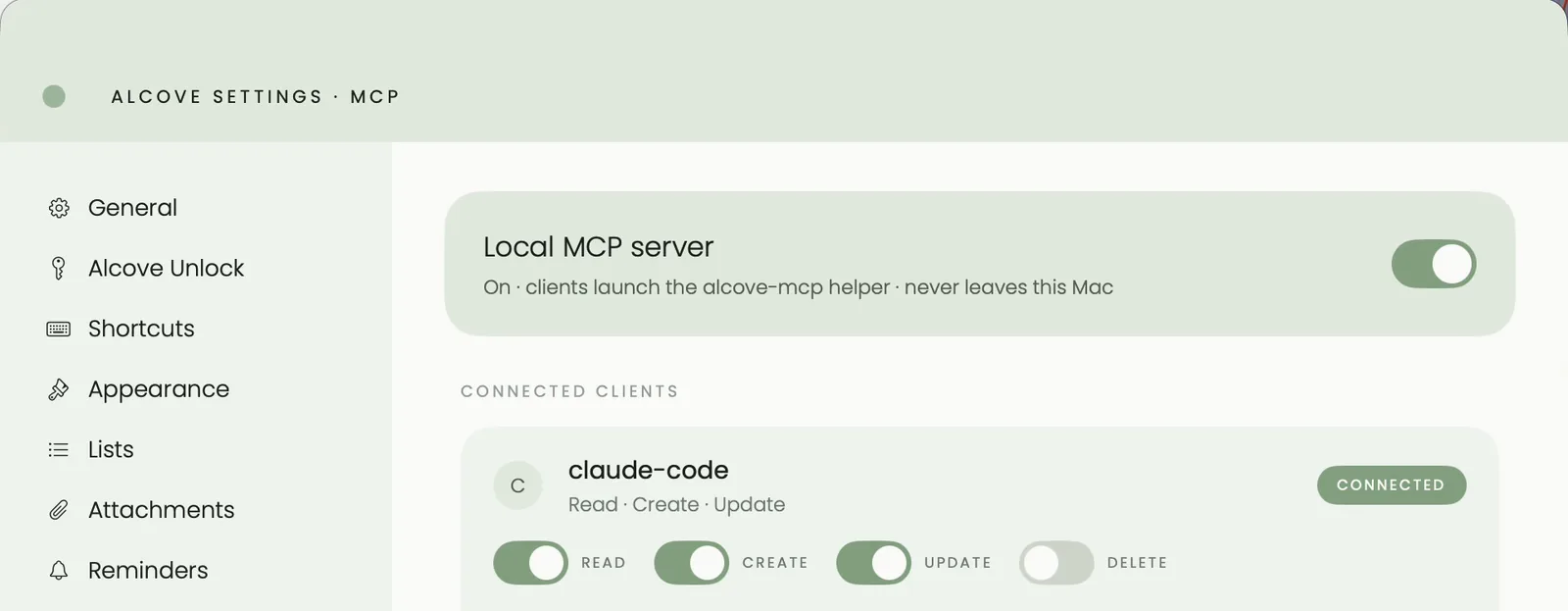
The controls differ too. Todoist's connection asks for one read-and-write permission, and Todoist notes that most assistants confirm before writing anything. 2Do's extension can reach only 2Do's task data, and lists you've locked stay locked. Alcove gives each assistant four switches (read, create, update and delete), makes every new assistant wait for your approval, starts it with read only, and records every request, refused ones included, in an activity log.
Whichever app you choose, start with read access only. Let the assistant summarise and suggest for a few days before you let it change anything.
Where Alcove fits (I make it)
Alcove: Tasks & Notes has a local MCP server built into its Mac app. It's off until you turn it on, needs no account, and nothing goes through an Alcove server, because there isn't one. Tasks an assistant adds on the Mac reach your iPhone and iPad through your own iCloud.
In version 1.0 the server has 29 tools for tasks, lists, tags, notes, attachments and a day summary. From version 1.1, assistants can also work with boards, set reminder types and read files and pictures you've attached. It works with Claude's desktop app, Claude Code and other apps that start local MCP servers.
Alcove isn't the right pick if you want Claude on your phone or the web to manage your tasks, or if you use ChatGPT: Todoist and TickTick do that. It also isn't a shared list for a family or team.
Setting it up takes about two minutes:
- In Alcove on the Mac, open Settings, choose MCP and turn on Local MCP server.
- Click Copy MCP config and add it to Claude's desktop app, or add the server to Claude Code with one command.
- Ask Claude about your tasks, then approve it in Alcove and choose what it may do.
The full steps for each assistant app are in connecting Claude to your to-do list, and planning your day with Claude has prompts to start with. For what Alcove keeps on your devices and what can leave them, see a private to-do list.
Sources
Checked in October 2026:
- Use Todoist in Claude and Connect Todoist to an AI assistant, Todoist Help Center
- TickTick MCP, TickTick Help Center
- Third-Party AI Tools and Things, Cultured Code
- Hey Siri, We're Ready!, The Omni Group, 14 September 2026, OmniFocus pricing and OmniFocus features
- 2Do Claude Desktop MCP extension and 2Do licensing explained
- Use Claude with iOS apps and Get started with custom connectors using remote MCP, Claude Help Center
- Connect and test your plugin and Secure MCP Tunnel, OpenAI
- Community servers: iMCP for Reminders on the Mac, and Microsoft To Do MCP
- App Store listings: Todoist, TickTick, Things 3 for Mac, iPhone and iPad, 2Do for iPhone and iPad, and Microsoft To Do
Questions people ask
Can Claude manage my to-do list?
Yes, if your to-do app has an MCP server or a Claude connector, or if you use Apple Reminders with Claude's iPhone app. Claude can then read, add, change and finish tasks, within the permissions the app and Claude give it.
Which to-do apps have an official MCP server?
Todoist and TickTick run official remote servers that work in every Claude app and in ChatGPT. 2Do and Alcove ship official local servers on the Mac. Things 3, OmniFocus and Microsoft To Do have community-built servers only, as of October 2026.
Can Claude remind me about my tasks?
Not by itself; reminders come from your to-do app. Claude can set a reminder time where the app's tools allow it, and the app delivers the reminder. In Alcove, an assistant can set when a reminder goes off, and from version 1.1 whether it's quiet, a notification or an alarm.
Does Things 3 have an official MCP server?
No. Cultured Code says Things doesn't offer a direct connection with Claude, ChatGPT or other assistants. Community servers exist, and Cultured Code advises using only ones built on its URL scheme, Shortcuts, AppleScript or Mail to Things, and never giving one your Things Cloud login.
Does ChatGPT work with local MCP servers like Alcove's?
Not as they are. ChatGPT reaches MCP servers over the internet, through a public HTTPS address or OpenAI's Secure MCP Tunnel, which is set up with an OpenAI Platform account. Alcove's server is a program on your Mac with no internet address, so ChatGPT can't add it directly, and I haven't tested a tunnel.
Is it safe to let an AI assistant delete tasks?
It's safest to leave delete off until you trust the assistant's changes. In Alcove, delete is its own switch for each assistant and every request is logged. Todoist's connection grants read and write access together, and Todoist's help advises reviewing changes before you confirm them.