How to plan your day in 10 minutes on Mac and iPhone
To plan your day, take ten minutes before you start, or the evening before. Check your calendar for fixed events, write down everything on your mind, choose three to five tasks that matter today, give each one a length, put the biggest in a time slot, and leave about a fifth of the day free. Then work from that short list, not the whole backlog. In Alcove, that's quick add or Speak tasks, Today and the hour grid.
Most days don't need a schedule for every hour. They need ten minutes at the start to decide what matters and where it fits. Here's a routine that does that, shown in Alcove: Tasks & Notes, which I make, though it works on paper or in any app.
The 10-minute routine
1. Check your calendar (1 minute)
Start with what's fixed: meetings, appointments, the school run. They decide how much of the day is actually yours. In Alcove, turn on your calendars in settings and their events appear on the calendar's hour grid beside your tasks. Alcove only reads them.
2. Empty your head (3 minutes)
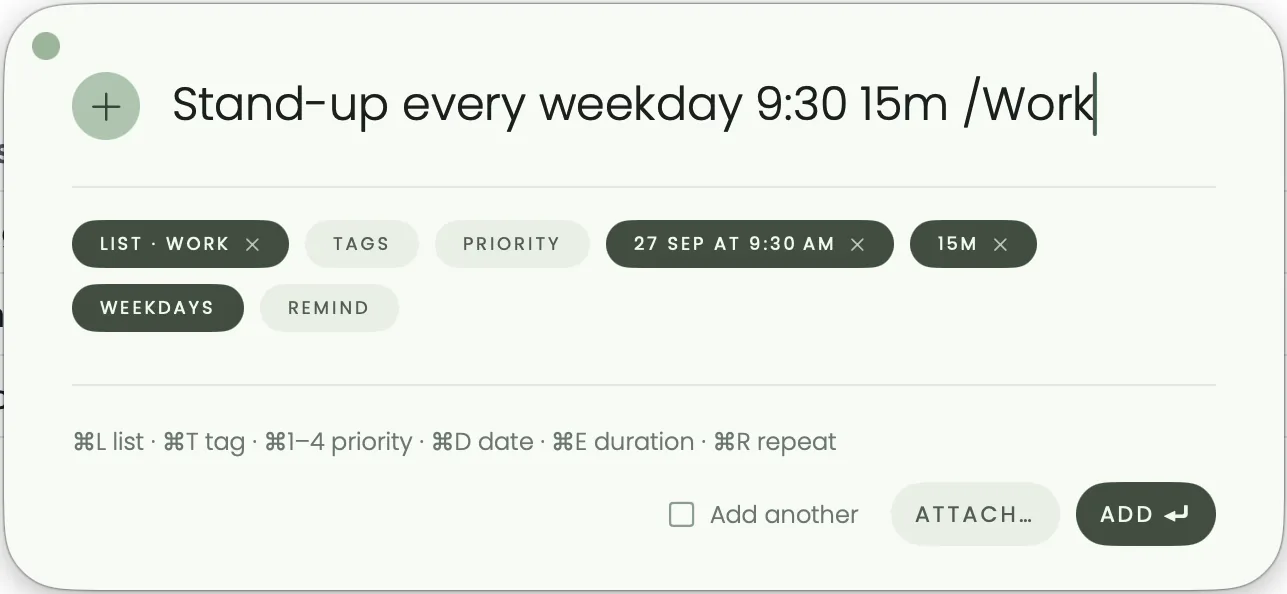
Write down everything that's nagging you, without sorting it yet. On the Mac, press ⌥ Space from any app and type each one as a sentence. Or open Speak tasks and say it all at once: "Call the dentist, buy milk on the way home, and the report's due Friday at five." Alcove splits that into separate tasks, which you check before adding. See adding tasks from any app and speaking your to-do list.
3. Choose today's few (3 minutes)
Pick three to five tasks that would make today a good day, and give them today's date: type today in quick add, or choose Today from a task's date. Give the most important one a higher priority, with !high or ⌘ 1 to ⌘ 4 in quick add, and Today lists it first. Everything else stays on its list. It isn't going anywhere.
4. Give each one a length (1 minute)
Add how long each task will take: 30m, 2h, or a range such as 14:00-16:00. Then add them up. If today's tasks come to six hours and you have four free, the plan doesn't fit, and it's better to find that out now than at 5pm.
5. Give the biggest one a time (2 minutes)
Open the calendar's Day view. Tasks due today without a time sit in the all-day row at the top: drag the most important one down onto the hour where it fits. Overdue tasks and tasks with no date wait in the Plan panel, beside the grid on the Mac (and on iPad when there's room); drag one onto a time to schedule it. On iPhone, tap Plan, pick a task, then tap a time. See time blocking on Mac and iPhone.
6. Leave a buffer
Leave about a fifth of your working day unplanned. Something will run over, and someone will need you. A plan with no slack breaks by mid-morning.
Choose a method
The routine above is a plain version of several well-known methods. Pick whichever matches how you think. Alcove has no special mode for any of them; priorities, Today and the hour grid cover each one.
| Method | How it works | In Alcove |
|---|---|---|
| Top three | Choose the three tasks that would make today a success, and do them first | Give them high priority so Today lists them at the top |
| 1-3-5 rule | One big task, three medium ones and five small ones: nine in all | High priority for the big one, medium for the three, low for the five |
| Ivy Lee method | The evening before, write down six tasks for tomorrow in order of importance, then do them one at a time | Date six tasks for tomorrow and put them in order on tomorrow's hour grid |
| Time blocking | Give every task its own slot on the calendar | Lengths, plus the hour grid in the Day or Week view (3 Days on iPhone) |
| Eat the frog | Do your most important, most challenging task first thing | Put it in the first slot of the morning |
Night before or morning?
Both work. What matters is that the plan exists before the day starts pulling at you.
- The night before lets you start straight away, and writing tomorrow down helps you stop thinking about it tonight. It suits people whose mornings get swallowed by email and messages. The Ivy Lee method is built this way.
- The morning lets you plan with today's energy and today's news. It suits people with a quiet first hour.
If you plan in the evening, five minutes is enough:
- Tick off what you finished, and look at what's left (1 minute).
- Move what's left to a new day, or back to its list with no date (2 minutes).
- Choose tomorrow's most important task and give it a time (2 minutes).
At the end of the day
In Alcove, a task you don't finish keeps its date and is marked overdue. Nothing moves it for you, so it can't quietly disappear.
- On iPhone and iPad, overdue tasks sit in an Overdue section at the top of Today, above today's own tasks.
- On the Mac, the Overdue count at the top of the main window opens them, and the calendar's Plan panel lists them first.
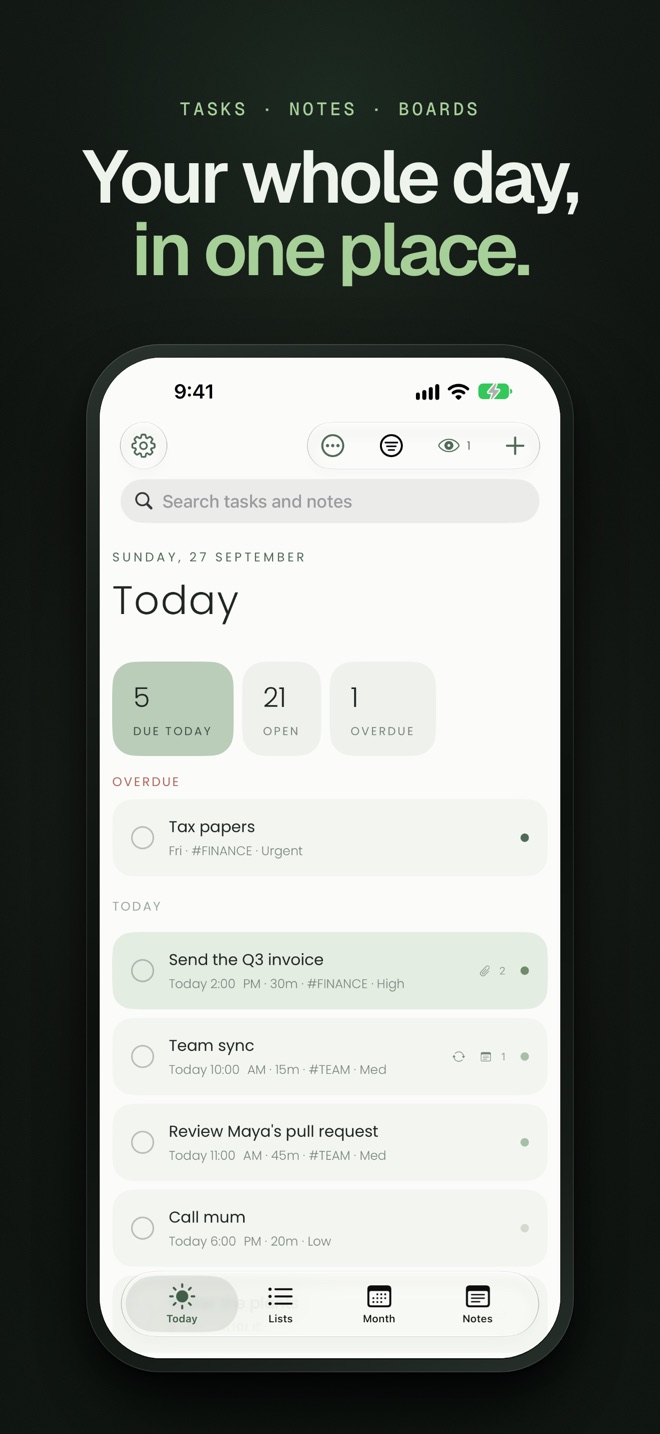
To move one, open its date and choose Today, Tomorrow or Next week, or on the Mac, drag it onto another day in the calendar. To move all of today's leftovers to tomorrow in one go, set up the evening recipe in Shortcuts automations for your to-do list.
Once a week, open Progress to see what you finished against what you added, and how much was done on time. If you add far more than you finish, plan fewer tasks rather than longer days. The weekly review checklist builds that look back into a routine, and planning your week sets the priorities your days draw from. If you use Claude with Alcove on the Mac, it can help with both; see planning with Claude.
On iPhone
- See today on the Home Screen. The Today's list widget shows today's tasks with a ring you tap to finish each one, without opening the app. See the widgets guide.
- Capture without stopping. Say "Hey Siri, speak tasks in Alcove", or, on iOS 18 or later, put the Speak Tasks control in Control Center or on the Action button.
- Hear your day. "Hey Siri, what's on today in Alcove" reads out how many tasks are due, which are high priority and when the next one starts.
- Make hard stops ring. For things that can't slip, like leaving for a train, choose Alarm as the reminder's type, and on iOS 26 and later it rings like an alarm, even on silent. See making a reminder ring like an alarm.
Sources
Checked in October 2026:
- The Ivy Lee Method, James Clear
- A Better To-Do List: The 1-3-5 Rule, The Muse
- Eat That Frog!, fourth edition, Brian Tracy, Penguin Random House
Questions people ask
What is the best way to plan your day?
Check your calendar first, then choose a short list of tasks that fits around it and give the most important one a time slot. Ten minutes is enough, and the routine on this page walks through it.
Should I plan my day the night before or in the morning?
Either works, as long as the plan exists before the day starts pulling at you. The night before lets you start straight away and stop thinking about work for the evening; the morning lets you plan with today's energy and news. If your mornings get swallowed by messages, plan the night before.
What is the 1-3-5 rule?
Plan one big task, three medium ones and five small ones for the day, nine in all. It comes from The Muse, which credits the approach to its founder, Alex Cavoulacos.
What is the Ivy Lee method?
At the end of each working day, write down the six most important things to do tomorrow, in order, then work through them one at a time and carry anything unfinished to the next day's list. It's credited to the consultant Ivy Lee, who is said to have taught it to Charles Schwab's executives at Bethlehem Steel in 1918.
How many tasks should be on a daily to-do list?
Three to five that matter, plus small things that fit around them. The 1-3-5 rule caps it at nine. If the list is longer than the day, it isn't a plan.
What happens to tasks I don't finish today?
In Alcove, they keep their date and are marked overdue, so nothing quietly disappears. On iPhone and iPad they sit in an Overdue section at the top of Today; on the Mac, the Overdue count opens them and the calendar's Plan panel lists them first. Nothing moves them for you, so give each a new day, or use a shortcut that moves today's leftovers to tomorrow.