Notes that do the maths: sums, tables and budgets
In an Alcove note, type a sum and end the line with an equals sign, for example "(480 + 12%) / 4 =", and the answer appears after it. Tables add up every column, can total across each row, and put a grand total in the corner. Mark a row as the budget and a row showing what's left appears.
Most of the maths in my life happens in notes: splitting a bill, pricing a trip, adding up hours. Leaving for a calculator and coming back with a number always felt like one step too many, so Alcove's notes do the sums themselves.
How do you calculate in a note?
Type the sum and finish the line with an equals sign. The answer appears straight after it:
| You type | You get |
|---|---|
1,200 + 50 = | 1250 |
200 + 10% = | 210 |
(480 + 12%) / 4 = | 134.4 |
3 * 12.50 = | 37.5 |
sqrt(144) = | 12 |
avg(12, 18, 30) = | 20 |
You can also put the cursor on a line and press the = button in the note's tools. It works the line out, and works it out again if the line already has an answer.
What can a note calculate?
- The usual operators:
+ - * / ( )and^for powers. The × and ÷ signs work too. - Percentages, the way a calculator reads them.
200 + 10%is 210. - A currency symbol in front of a number (
$,£,€,¥or₹), so£12 + £8.50still adds up. - Functions:
sqrt,abs,round,floor,ceil,min,max,sumandavg. - Thousands separators. A comma is read as one, so
1,200is twelve hundred. The decimal point is a point.
A line that doesn't read as a whole sum is left alone. Notes are mostly words, and a sentence should never turn into a number nobody asked for.
How do tables with totals work?
Add a table from the note's tools or the slash menu, and it keeps its own totals: down every column, across the rows, and a grand total in the corner.
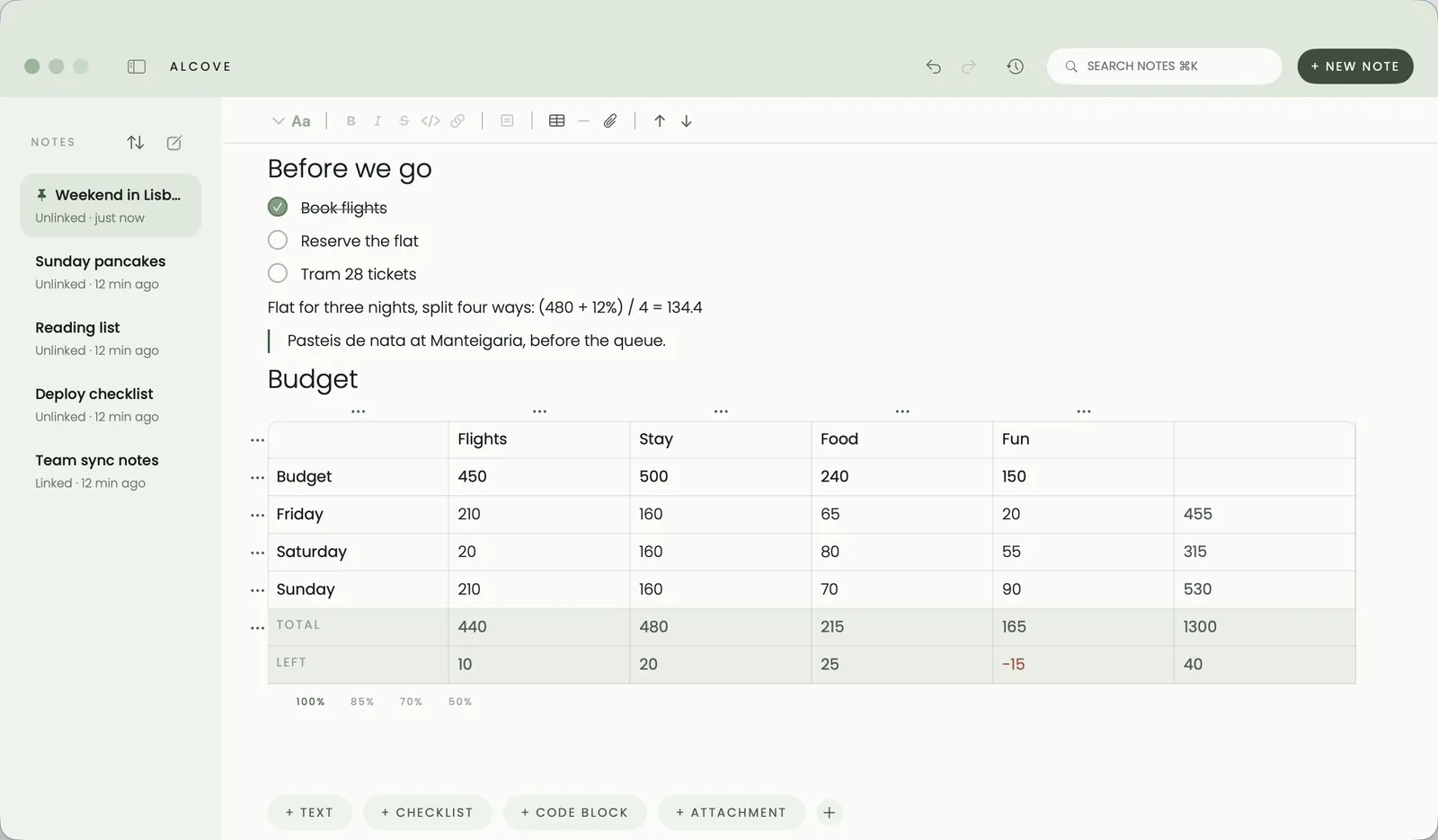
Each row has a small menu for working with it:
- Insert row above or below
- Make it a heading
- Use as budget
- Colour
- Total across
- Delete row
How do budget rows work?
Pick a row and choose Use as budget. That row becomes the target, the totals leave it out, and a Left row appears showing how much of each column's budget is still unspent. If you go over, the number turns red.
It's how I plan trips. The budget row says what I'm willing to spend on flights, the stay, food and fun. The rows under it are the days, and the Left row keeps me honest as I add things.
What else can a note do?
Notes use a few typed shortcuts, so you rarely reach for a menu:
- Type
#and a space at the start of a line for a heading. - Type
[]for a checklist item. - Type
/for any kind of block: a code block with syntax highlighting, a divider, an attachment and more.
You can link a note to a task, so the meeting notes sit right beside the meeting in your list. On the Mac, File ▸ Export as Markdown saves a note as a plain Markdown file you can take anywhere.
Questions people ask
Do calculations work on iPhone and iPad?
Yes. Typing = at the end of a line works on Mac, iPhone and iPad, and so does the = button in the note's tools.
Can it handle percentages?
Yes, the way a calculator does. 200 + 10% is 210, and (480 + 12%) / 4 is 134.4.
What happens if a line isn't a sum?
Nothing. A line that doesn't read as a whole calculation is left alone, so ordinary sentences never turn into numbers.
Can I get my notes out of Alcove?
Yes. On the Mac, File then Export as Markdown saves a note as a Markdown file.