OmniFocus alternatives for Mac and iPhone
Things 3 is the closest OmniFocus alternative if you want projects without the ceremony: $49.99 on Mac, $9.99 on iPhone and $19.99 on iPad, paid once. 2Do keeps start dates and saved searches for a lighter GTD. Todoist and TickTick suit you if you need Windows, Android or the web. GoodTask keeps your tasks in Apple Reminders. Alcove is a calmer menu bar list with boards and an hour grid, $29.99 once for all three devices. If you use defer dates and perspectives every day, stay with OmniFocus.
OmniFocus is the most complete task manager on Apple devices and the reference app for Getting Things Done. People look for an alternative for three reasons: the system takes more upkeep than they want to give it, the price, or they need Windows, Android or a web app. This guide is organised around those reasons, with the apps in the order most readers will want them.
How I compared. I make Alcove, one of the apps below, so read this with that in mind. I checked each app's App Store listing, pricing page and help documentation on 8 October 2026; prices are US. Alcove has its own labelled section, and I say plainly where another app is the better choice.
What OmniFocus still does best
Before you leave, be clear about what you'd give up. OmniFocus 4, at version 4.9 since September 2026, does several things the apps below match only in part, if at all:
- Defer dates. An action stays out of sight until the day it becomes relevant, with due dates kept separate for real deadlines.
- Sequential projects. Actions become available one after another, so you only see the next step.
- The Review. Projects come up for review on a schedule, and you mark each one reviewed as you go.
- Custom perspectives (Pro). Saved views that filter and group by project, tag, date and more.
- Location tags. The Nearby view shows actions tagged with a place, on a map or in a list.
- Automation (Pro). Omni Automation plug-ins run on Mac, iPhone and iPad. From version 4.8 they can use Apple's on-device language model, for example to break a project into actions, and version 4.9 lets Siri set due dates, flags, notes and repeat schedules.
- Every Apple device, and the web. Mac, iPhone, iPad, Apple Watch and Vision Pro, plus OmniFocus for the Web with the subscription.
OmniFocus isn't subscription-only. A universal perpetual licence costs $74.99 (Standard) or $149.99 (Pro), covers every Apple device and includes all 4.x updates; future major versions are offered to owners at a discount. The alternative is a $99.99 yearly subscription, which always gives you the latest Pro version plus the web app. Licence owners can add web access for $4.99 a month or $49.99 a year. There's a 14-day trial, and OmniFocus 4 needs macOS 15.2 or iOS 18.2 or later.
If you open perspectives and the Review every week, stay. Nothing below replaces them. The rest of this guide is for people who mostly use OmniFocus as a list with dates.
OmniFocus alternatives at a glance
| App | Cost for Mac, iPhone and iPad | Runs on | What you keep | What you give up |
|---|---|---|---|---|
| Things 3 | $79.97 once ($49.99 Mac, $9.99 iPhone, $19.99 iPad) | Mac, iPhone, iPad, Apple Watch, Vision Pro | Areas, projects, tags, an Inbox, start dates that hide to-dos until their day | Sequential projects, the Review, custom perspectives, location reminders, attachments, a web app |
| 2Do | $79.97 ($49.99 Mac from 2doapp.com, $9.99 iPhone, $19.99 iPad) | Mac, iPhone, iPad, Android | Projects, tags, start dates that hide tasks, Smart Lists, location tags | Mac updates stop after 18 months unless you renew; no Windows or web app |
| Todoist | Free plan, or Pro at $60 a year ($7 month to month) | Web, Mac, Windows, Linux, iPhone, iPad, Android, Apple Watch, Wear OS | Projects, sub-tasks, labels for contexts, filters, sharing | Start or defer dates; a one-time price. The free plan stops at 5 projects |
| TickTick | Free plan, or Premium at $49.99 a year | Web, Mac, Windows, Linux, iPhone, iPad, Android | Lists, tags, sub-tasks, a calendar view and habits; filters in Premium | A one-time price. The free plan stops at 9 lists of 99 tasks |
| GoodTask | $59.98 once ($39.99 Mac, $19.99 iPhone and iPad) | Mac, iPhone, iPad, Apple Watch | Smart lists, day, week and month views, boards, with your data in Apple Reminders | Anything Reminders can't store, such as defer dates and review schedules |
| Apple Reminders | Free | iPhone, iPad, Mac, Apple Watch, iCloud.com | Tags, smart lists, sub-tasks, location reminders | Defer dates, sequential projects, the Review |
| Alcove | $29.99 once, after a 14-day free trial | Mac, iPhone, iPad | An Inbox, lists in folders, tags for contexts, repeating tasks, a calendar with an hour grid | Defer dates, sequential projects, the Review, custom perspectives, Apple Watch, the web |
If OmniFocus feels like too much
Things 3 is the usual next step. It organises work into areas and projects, splits big projects with headings, and uses When dates much as OmniFocus uses defer dates: a to-do with a future start date waits in Upcoming and moves into Today on the day. This Evening keeps later-in-the-day to-dos apart, the Logbook keeps everything you've finished, and Quick Entry on the Mac opens from any app with ⌃ Space.
Things is sold per device: $49.99 for Mac (with a 15-day trial), $9.99 for iPhone with the Apple Watch app included, and $19.99 for iPad. There's no subscription, Things Cloud sync is free, and Family Sharing is supported. It doesn't have sequential projects, a built-in review, custom perspectives or location reminders, and it can't share lists. Version 3.24, in September 2026, added Siri AI and Spotlight integration. See Things 3 alternatives if Things itself isn't quite right.
If you need Windows, Android or the web
Todoist runs on almost everything: the web, Mac, Windows, Linux, iPhone, iPad, Android, Apple Watch and Wear OS. Projects have sections and sub-tasks, labels work as contexts, and filters build views across projects (3 on the free plan, 150 on Pro). You can share a personal project with up to five people on any plan. The free Beginner plan allows 5 personal projects; Pro, which adds the calendar layout, task durations and Task Assist, has cost $5 a month billed yearly ($60) or $7 month to month since 10 December 2025. Todoist's own help says it doesn't support start dates that hide tasks, so defer dates are the main thing you'd lose. It also runs an official MCP server for assistants such as Claude and ChatGPT.
TickTick also runs everywhere, including the web and Linux. The free plan allows 9 lists of 99 tasks; Premium, at $49.99 a year, raises that to 299 lists of 999 tasks and adds filters, more calendar views, a timeline view and task durations. It suits you if you'd like habits and an Eisenhower matrix in the same app.
OmniFocus for the Web is worth a thought if what you really need is a browser rather than a new app. It's included with the $99.99 yearly subscription, or $4.99 a month or $49.99 a year for licence owners, and it keeps your data and your system as they are. It needs Omni's sync server.
For a wider look at the cross-platform apps, see Todoist alternatives for Mac and iPhone.
If you want to keep doing GTD with a lighter app
Most of GTD survives the move. Here's where OmniFocus's ideas go:
| OmniFocus | Things 3 | Todoist | Alcove |
|---|---|---|---|
| Inbox | Inbox | Inbox | Inbox |
| Tags as contexts | Tags | Labels | Tags |
| Defer dates | When (start) dates | Not supported | Not supported; give a task the day you'll do it |
| Due dates | Deadlines | Dates, plus Deadlines in Pro | Dates |
| Review | A repeating weekly to-do | A repeating weekly task | A repeating weekly task, and the Progress screen |
| Perspectives | Tag filters and Quick Find | Filters | Today, Upcoming, lists and tags |
2Do is the closest to OmniFocus's power in a lighter shape. It has projects with sub-tasks, start dates that keep what can't start yet out of sight, Smart Lists it describes as "perspectives, not folders", tags you can pause to hide a whole context, a Nearby map for location-tagged tasks, and a built-in MCP server for assistants. It syncs through Dropbox, Apple Reminders, iCloud, Todoist or your own CalDAV server. Mind the licensing: the $49.99 Mac app from 2doapp.com is a perpetual licence with 18 months of updates, after which you keep the last version or renew at a discount. The Mac App Store version is subscription-only. The iPhone ($9.99) and iPad ($19.99) apps are separate one-time purchases, and there's an Android app.
Whichever app you choose, make "Weekly review" a repeating task so it doesn't get skipped. See a weekly review checklist and a simple GTD setup.
If price is the reason
What one person pays for Mac, iPhone and iPad, at the prices above:
| App | 1 year | 3 years | 5 years |
|---|---|---|---|
| OmniFocus subscription | $99.99 | $299.97 | $499.95 |
| OmniFocus 4 Pro licence | $149.99 | $149.99 | $149.99 |
| OmniFocus 4 Standard licence | $74.99 | $74.99 | $74.99 |
| Todoist Pro, billed yearly | $60 | $180 | $300 |
| TickTick Premium | $49.99 | $149.97 | $249.95 |
| Things 3 | $79.97 | $79.97 | $79.97 |
| 2Do | $79.97 | $79.97 | $79.97 |
| GoodTask | $59.98 | $59.98 | $59.98 |
| Alcove | $29.99 | $29.99 | $29.99 |
| Apple Reminders | Free | Free | Free |
One-time prices assume you keep using the version you bought. A new major version of OmniFocus is a discounted paid upgrade, and 2Do's Mac updates after 18 months need a renewal. If you already own an OmniFocus 4 licence, staying costs nothing more unless you choose to buy a future major upgrade. For every app's current prices in one place, see what to-do apps cost and to-do apps without a subscription.
Where Alcove fits (I make it)
Alcove: Tasks & Notes is for people who want their day one click away rather than a system to maintain. It lives in the Mac menu bar, with today's tasks, every list, the month and your notes in a popup, and you add tasks from any app with ⌥ Space and one sentence: "Call the accountant Friday 10am #calls". Tasks without a list wait in the Inbox, tags work as contexts, and there are boards, a calendar with Day, Week and Month views and an hour grid, and notes beside your tasks. It's $29.99 once for Mac, iPhone and iPad together, after a 14-day free trial, with no account and no subscription.
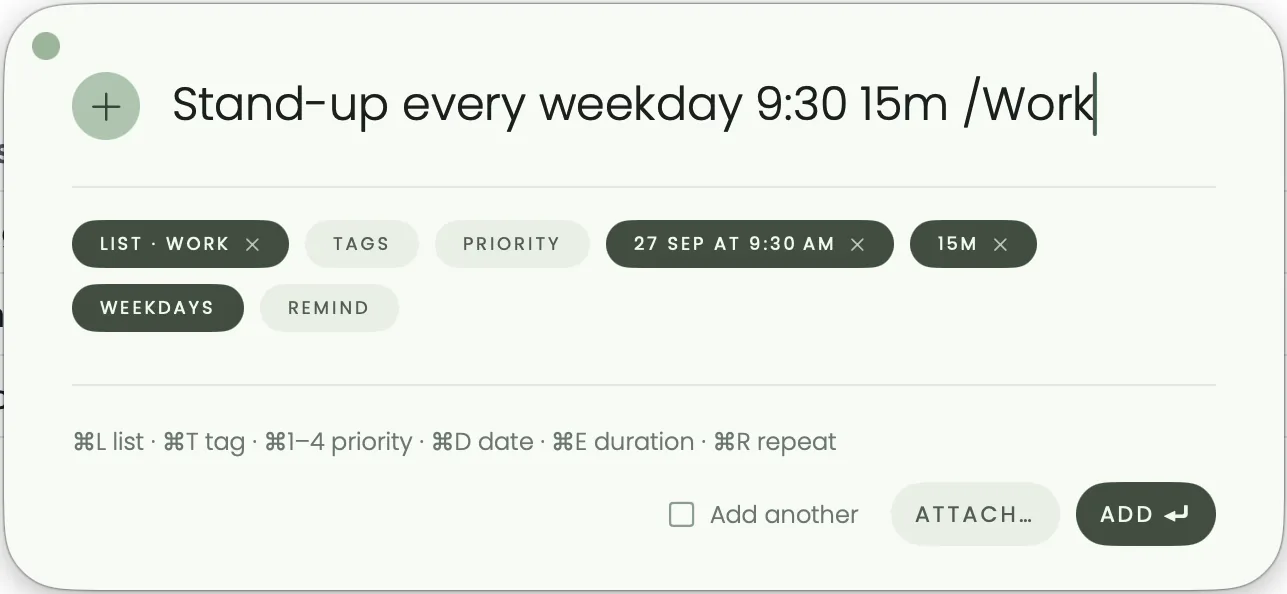
It isn't an OmniFocus replacement for a serious GTD practice. There are no defer dates, sequential projects, built-in Review or custom perspectives, no Apple Watch app and no web version. For a closer look, see Alcove vs OmniFocus.
Moving your tasks out of OmniFocus
On the Mac, choose File, then Export, in OmniFocus. You can export an OmniFocus document, Plain Text (compatible with TaskPaper), Simple HTML, CSV or a backup. On iPhone and iPad, Database Settings offers Export to CSV.
- To Things 3. Cultured Code provides an AppleScript importer, so it works only on the Mac and only with OmniFocus Pro (Standard doesn't support AppleScript). Folders become areas, projects stay projects, planned or defer dates become When dates, due dates become deadlines and flags become a Flagged tag. Repeating actions arrive without their schedule, nested actions are flattened, and attachments and estimated durations are left out. With OmniFocus Standard, paste the Plain Text export into Things, which turns each line into a to-do.
- To Todoist. Todoist imports a CSV file into a project, but in its own column format and up to 300 tasks per project, so reshape OmniFocus's CSV in a spreadsheet first.
- To Alcove. There's no importer. Export Plain Text, change each "- " at the start of a line to "- [ ] " in a text editor, and paste the lines into an Alcove note, where they arrive as a checklist; tags and dates come across as text. Then choose Make this a task on each item you want to keep. Or switch on Alcove's MCP server and ask an assistant to read the CSV and create the tasks. See connecting an AI assistant.
Starting with a clean slate is a fair option too. Cultured Code suggests it in its own import guide.
Which should you choose?
- You use perspectives, sequential projects and the Review every week: stay with OmniFocus.
- You want projects and calm, on Apple devices only: Things 3.
- You want GTD depth without OmniFocus's weight, and don't mind its licensing: 2Do.
- You need Windows, Android or a web app: Todoist, or TickTick if you want calendar views and habits too.
- You want your tasks to stay in Apple Reminders: GoodTask.
- You want free: Apple Reminders.
- You want your day in the Mac menu bar, boards and an hour grid, for one small price: Alcove.
Sources
Checked in October 2026:
- OmniFocus pricing, features, trial versions and paying for updates, The Omni Group
- OmniFocus 4 Reference Manual: Database, including exporting, Inspector and Perspectives, The Omni Group
- OmniFocus 4.8 gets on-device Apple Intelligence support and OmniFocus adds Siri AI support, 9to5Mac
- Things 3 for Mac, iPhone and iPad on the App Store; Getting Things, Today, Upcoming, Anytime and Someday, Importing data from OmniFocus, Importing data from other apps and the Mac release notes, Cultured Code
- 2Do, 2Do licensing explained and 2Do store
- Todoist pricing, Todoist Pro pricing update, Todoist downloads, Does Todoist support start dates?, Import or export a project as a CSV file and Connect Todoist to an AI assistant
- TickTick Premium and TickTick downloads
- GoodTask introduction, and GoodTask for iPhone and iPad and Mac on the App Store
- Use Reminders on your iPhone or iPad and Use Reminders on iCloud.com and Use reminders on Apple Watch, Apple Support
Questions people ask
Is Things 3 better than OmniFocus?
For people who find OmniFocus too much, usually yes: Things 3 keeps areas, projects, tags and start dates with far less to set up and maintain. OmniFocus is better if you rely on sequential projects, the Review or custom perspectives, which Things doesn't have.
What is the easiest OmniFocus alternative?
Apple Reminders is the easiest, because it's free, already on your devices and has tags, smart lists and location reminders. Things 3 is the easiest paid step down that still keeps projects. Alcove is simpler again: a list in the Mac menu bar that you add to with one sentence.
Is OmniFocus still sold as a one-time purchase?
Yes. OmniFocus 4 sells a universal perpetual licence for Mac, iPhone, iPad, Apple Watch and Vision Pro at $74.99 (Standard) or $149.99 (Pro), including all 4.x updates. Future major versions are discounted paid upgrades. The other option is a $99.99 yearly subscription that includes Pro and the web version.
What is the best cross-platform alternative to OmniFocus?
Todoist, if you want projects, labels and filters on Windows, Android, Linux and the web as well as Apple devices; Pro is $60 a year. TickTick suits you if you also want calendar views and habits, at $49.99 a year. OmniFocus's own web subscription is the option that keeps your existing data.
Can I export my OmniFocus tasks to another app?
Yes. OmniFocus for Mac exports Plain Text (compatible with TaskPaper), Simple HTML and CSV, and the iPhone and iPad apps export CSV. Things 3 also offers an import script for OmniFocus Pro on the Mac, which keeps folders, projects, tags and dates but drops repeat schedules.
Can I keep doing GTD with a simpler app?
Yes. Use tags for contexts, the Inbox for capture and a repeating weekly task for the review. What you usually lose is OmniFocus's defer dates, which hide an action until it's relevant; Things 3 and 2Do have start dates that do something similar.