Daily planner apps for Mac and iPhone, compared
The free option is Apple Reminders with Calendar, which shows scheduled reminders beside your events, and in iOS 27 you can describe a reminder in your own words on iPhones with Apple Intelligence. Structured lays your day out on a visual timeline, Sunsama walks you through a daily planning routine, and Things 3 shows your calendar events above Today. To put tasks on an hour grid beside your calendar events with no subscription, Alcove is $29.99 once for Mac, iPhone and iPad.
A to-do list tells you what to do. A planner tells you when. If you've ever finished a day with the list untouched because meetings ate the time, what you want is an app that puts your tasks and your calendar in one place. Here are the ones worth knowing on Mac and iPhone, grouped by how they want you to plan.
How I compared. I make Alcove, so read this with that in mind. I checked each app's App Store listing, pricing page and help documentation on 8 October 2026; prices are US.
Planner or to-do list?
Three things make an app a planner rather than a list: tasks can have a time, your calendar events sit beside them, and there's a routine for deciding what today holds. A list app can do one of these; a planner does all three. Some apps below lean on a timeline, some on a guided routine, and some on a calendar you already use.
At a glance
Prices checked on 8 October 2026.
| App | How you plan | Shows calendar events | Runs on | Cost for Mac, iPhone and iPad | Subscription |
|---|---|---|---|---|---|
| Apple Reminders and Calendar | Timed reminders sit in Calendar's day schedule | Yes | Mac, iPhone, iPad | Free | No |
| Structured | A visual timeline of your day | Can import your calendars | iPhone, iPad, Mac, Android, web | Free, or Pro by subscription or $99.99 for Lifetime | Optional |
| Sunsama | A guided daily plan, then timeboxing on your calendar | Yes: Google, Outlook and Apple calendars, both ways | Mac, iPhone, iPad, Windows, Android, Linux | $204 a year, or $22 a month | Yes |
| Ellie | A brain-dump list beside your calendar; timebox mode in Pro | With Pro (Google and Apple Calendar) | Mac, iPhone, iPad, Windows, web | Free, or Pro at $9.99 a month, or $299.99 for Lifetime | Optional |
| Things 3 | A Today list, with This Evening | Yes, at the top of Today and in Upcoming | Mac, iPhone, iPad, Apple Watch, Vision Pro | $79.97 | No |
| Parchment | One page per day: your agenda and a daily note | Yes, with your Apple Reminders | iPhone, iPad, Mac | $4.99 | No |
| BusyCal | A full calendar app with tasks | Yes | Mac, iPhone, iPad, Apple Watch | $59.98, buying the Mac app direct | Not if bought direct |
| Alcove (I make it) | A Today list, and tasks placed on an hour grid | Yes, read-only, once you turn it on | Mac, iPhone, iPad | $29.99 | No |
Free: Apple Reminders and Calendar
If you use Apple's apps already, you have a basic planner. Since iOS 18 and macOS Sequoia, Calendar can show your scheduled reminders: on the Mac, select Scheduled Reminders in the calendar list. All-day reminders appear at the top of the day, and reminders with a time sit at that time in the day's schedule. You can create, complete and edit them right in Calendar.
iOS 27 makes adding reminders quicker: on iPhones with Apple Intelligence you can describe a new reminder in your own words and let it fill in the details, and the editor inside a list now offers the date, time, Urgent and repeat options without opening the full details.
Where it falls short is that it's two apps working together rather than one planner: you plan in Calendar and keep your lists in Reminders. If that's enough for you, you don't need anything else on this page.
A visual timeline: Structured
Structured draws your day as a timeline, with your tasks and events in order through the day. You can create tasks quickly or bring in your existing calendars. It runs on iPhone, iPad, Mac, Android and the web, with an Apple Watch app.
Structured is free to start. Structured Pro is a subscription, and the US App Store lists several Pro prices, from $2.99 to $7.99 a month and $9.99 to $34.99 a year, alongside a $99.99 Lifetime purchase. If you'd like a picture of the day rather than a list, it's the one to try first.
A guided daily routine: Sunsama and Ellie
Sunsama is built around a routine: guided planning each morning, timeboxing tasks on your calendar, and a daily shutdown at the end. It syncs both ways with Google, Outlook and Apple calendars, and runs on Mac, iPhone, iPad, Windows, Android and Linux. It costs $17 a month billed yearly ($204 a year) or $22 monthly, after a 14-day free trial with no card needed. If your work spans several calendars and platforms and you want a routine to follow every day, Sunsama is the stronger choice.
Ellie keeps a loose list, a brain dump, beside your real calendar, and Pro adds timebox mode. The free plan includes unlimited tasks and the brain dump on iPhone, iPad and the web. Pro adds timeboxing, Google and Apple Calendar, recurring tasks, labels, subtasks, due dates and reminders, and an AI assistant, for $9.99 a month, less billed yearly ($99.99 a year in the App Store), or $299.99 once for Lifetime. Ellie runs on Mac, Windows, the web, iPhone and iPad; students get 50% off the yearly plan.
Tiimo is worth a mention too: Apple named it the 2025 iPhone App of the Year for its visual planner. It has a free version in its iOS and Android apps, and Tiimo Pro is a subscription that adds the web planner and its other features across iPhone, iPad, Apple Watch, Android, Mac and the web.
A calm list beside your calendar: Things 3
Things 3 is a to-do app first, but it plans the day well. Choose which calendars to show, and their events are grouped at the top of your Today list, with your to-dos below. This Evening keeps the things you'll do later apart, and Upcoming shows the days ahead with scheduled and repeating to-dos, deadlines and calendar events. It shows the day as a list rather than a timeline.
It's a one-time purchase per kind of device: $49.99 for Mac, $9.99 for iPhone (with the Apple Watch app) and $19.99 for iPad, $79.97 for all three. There's a 15-day trial on the Mac, and Family Sharing is supported. For the full price picture, see what to-do apps cost.
Where Alcove fits (I make it)
Alcove: Tasks & Notes is a to-do list, planner and notebook for Mac, iPhone and iPad. For planning a day it has:
- Today, which on the Mac lives in the menu bar, with a count of what's due, so the day is a click away from any app.
- A calendar with Day, Week and Month views (3 Days instead of Week on iPhone). Day and Week show an hour grid with an all-day row, and a task with a time fills its length on the grid.
- The Plan panel, which lists the tasks that still need a time, overdue first. On the Mac, and on an iPad with room for the panel, drag a task onto the grid; on iPhone, tap Plan, pick a task, then tap a time.
- Your calendar events beside your tasks. Turn on Show calendar events in Settings and choose which calendars appear. Alcove only reads them and never changes them.
- Widgets for the Home Screen, Lock Screen and Mac desktop, and quick add with ⌥ Space on the Mac, where "Write the proposal tomorrow 9am 2h" gets its day, time and length as you type.
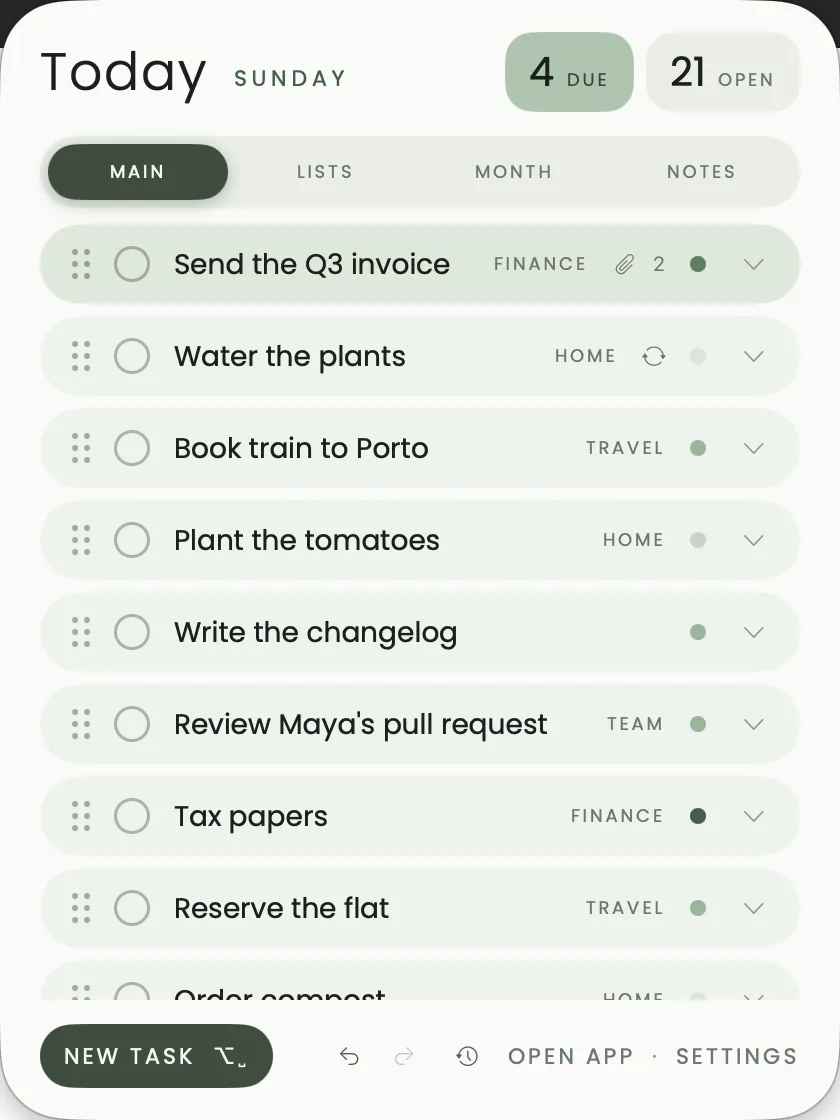
It's free for 14 days, then $29.99 once (US) for Mac, iPhone and iPad together, with Family Sharing. There's no subscription and no account; everything syncs through your own iCloud. It needs macOS 14 or iOS and iPadOS 17.4 or later. The method itself is in time blocking on Mac and iPhone, and a routine for using it is in plan your day.
Other one-purchase planners: Parchment, BusyCal and Sorted³
Parchment puts Apple Calendar, Apple Reminders and a daily note together on one page per day. It's $4.99 once for iPhone, iPad and Mac, with Family Sharing and no Parchment account, and it needs iOS 26 or later. Because your events and tasks stay in Apple's apps, it's a light way to plan if Reminders already holds your list.
BusyCal is a calendar app for Mac and iPhone with tasks. Bought from its own site, the Mac app is $49.99 with 18 months of updates, after which you keep the version you have or renew. The iPhone and iPad app is a one-time $9.99 in the App Store, covering iPhone, iPad and Apple Watch, with Family Sharing. The Mac App Store version is different: it's a subscription at $4.99 a month or $39.99 a year. There's a 14-day free trial on the Mac.
Sorted³ puts calendar events and tasks on one timeline, with notes. It's free to download, and Pro is a one-time purchase with no subscription: $35.99 for iOS and macOS together in the App Store, after 14 days of trying the Pro features. It hasn't been updated since October 2024, so weigh that before you buy.
Is there a daily planner for Mac that combines tasks and calendar without a subscription?
Yes. Apple Reminders with Calendar is free; Parchment ($4.99), BusyCal bought direct ($59.98 for Mac, iPhone and iPad) and Things 3 ($79.97) are one-time purchases; and Alcove is $29.99 once for Mac, iPhone and iPad if you want tasks on an hour grid beside your calendar events.
Where Alcove isn't the right fit
- No habit tracker or focus timer. Tiimo has a focus timer, and TickTick has a Pomo timer and habits.
- No AI auto-scheduling. Alcove doesn't plan the day for you; you place the tasks.
- No Apple Watch app. Things 3, Structured and Tiimo have one.
- Apple devices only. For Windows, Android or Linux, look at Sunsama, Structured or Ellie.
- No shared planning. Alcove is for one person's day, not a team's.
Sources
Checked in October 2026:
- Use reminders in Calendar on Mac, Apple Support, and iOS 18 makes iPhone more personal, capable, and intelligent than ever, Apple Newsroom
- Here's everything new for Reminders in iOS 27, 9to5Mac
- Structured, Structured across platforms and Structured on the App Store
- Sunsama and Sunsama pricing
- Ellie pricing and Ellie on the App Store
- Tiimo pricing and FAQ and Apple unveils the winners of the 2025 App Store Awards, Apple Newsroom
- Things features, Getting Things and Things 3 for Mac, iPhone and iPad on the App Store
- Parchment and Parchment on the App Store
- BusyCal, the BusyCal store, and BusyCal on the Mac App Store and the App Store
- Sorted³ on the App Store and TickTick on the App Store
- Alcove: Tasks & Notes on the App Store
Questions people ask
Is there a daily planner for Mac that combines tasks and calendar?
Yes, several. Apple Calendar shows your scheduled reminders beside your events from macOS Sequoia, Things 3 shows calendar events at the top of its Today list, BusyCal is a calendar app with tasks, Parchment puts Apple Calendar, Reminders and a daily note on one page, and Alcove puts tasks on an hour grid beside your calendar events.
What's the best daily planner app for Mac without a monthly subscription?
Parchment is the cheapest at $4.99 once if your tasks live in Apple Reminders. BusyCal costs $49.99 for the Mac from its own site plus $9.99 for iPhone and iPad if you want a full calendar app. Things 3 is $79.97 for Mac, iPhone and iPad if you want a list rather than a grid, and Alcove is $29.99 once for all three if you want tasks on an hour grid beside your events.
Can a daily planner app sync between Mac, iPhone and iPad?
Yes. Reminders, Calendar, Parchment and Alcove sync through your own iCloud, Things syncs through its free Things Cloud, and Structured, Sunsama and Ellie sync through their own services.
What is the best free daily planner for iPhone?
Apple Reminders with Calendar, because it's built in and shows your timed reminders in the day's schedule. Structured and Tiimo also have free versions, with paid upgrades.
Which daily planner apps work offline?
Apps that keep your plans on the device work offline and sync when you're back online. Apple Reminders and Calendar, Things 3, Parchment and Alcove all store your data on the device. If you plan in a browser, check the app's own help pages first.