The best personal kanban apps for Mac and iPhone
A personal kanban app shows your tasks as cards in columns such as To do, Doing and Done. Apple Reminders' column view is free, Kan Do is $2.99 once, TickTick's kanban view is in its free plan, and Trello suits shared boards. Alcove's boards keep each card in its list and in Today, so a card dropped in Done is finished everywhere.
Kanban turns a list into a picture of your work. Each task is a card, the columns show where it's up to, and moving a card is the update. For one person it's a good way to see what's in progress, notice when too much is, and finish things before starting new ones.
Most kanban tools are built for teams. This guide is about boards for yourself, on a Mac and an iPhone. I make Alcove, one of the apps below; prices were checked on each app's site or App Store page in October 2026.
Personal kanban apps at a glance
| App | Price | Runs on | Done column completes the task | Cards also in your lists |
|---|---|---|---|---|
| Alcove | $29.99 once for Mac, iPhone and iPad, after a 14-day free trial | Mac, iPhone, iPad | Yes | Yes |
| Kan Do | $2.99 once for all Apple devices | Mac, iPhone, iPad, Watch, Vision Pro, Apple TV | Not stated | Boards are the app |
| Apple Reminders | Free | Apple devices | No | The board is the list |
| TickTick | Kanban view in the free plan | Every platform | Not stated | Yes, as a view of a list |
| Todoist | Board layout in the free plan | Every platform | Not stated | Yes, as a layout of a project |
| Trello | Free plan, paid plans for teams | Web, Mac, iPhone, Android, Windows | No | Boards are the app |
Alcove: boards that are a view of your tasks
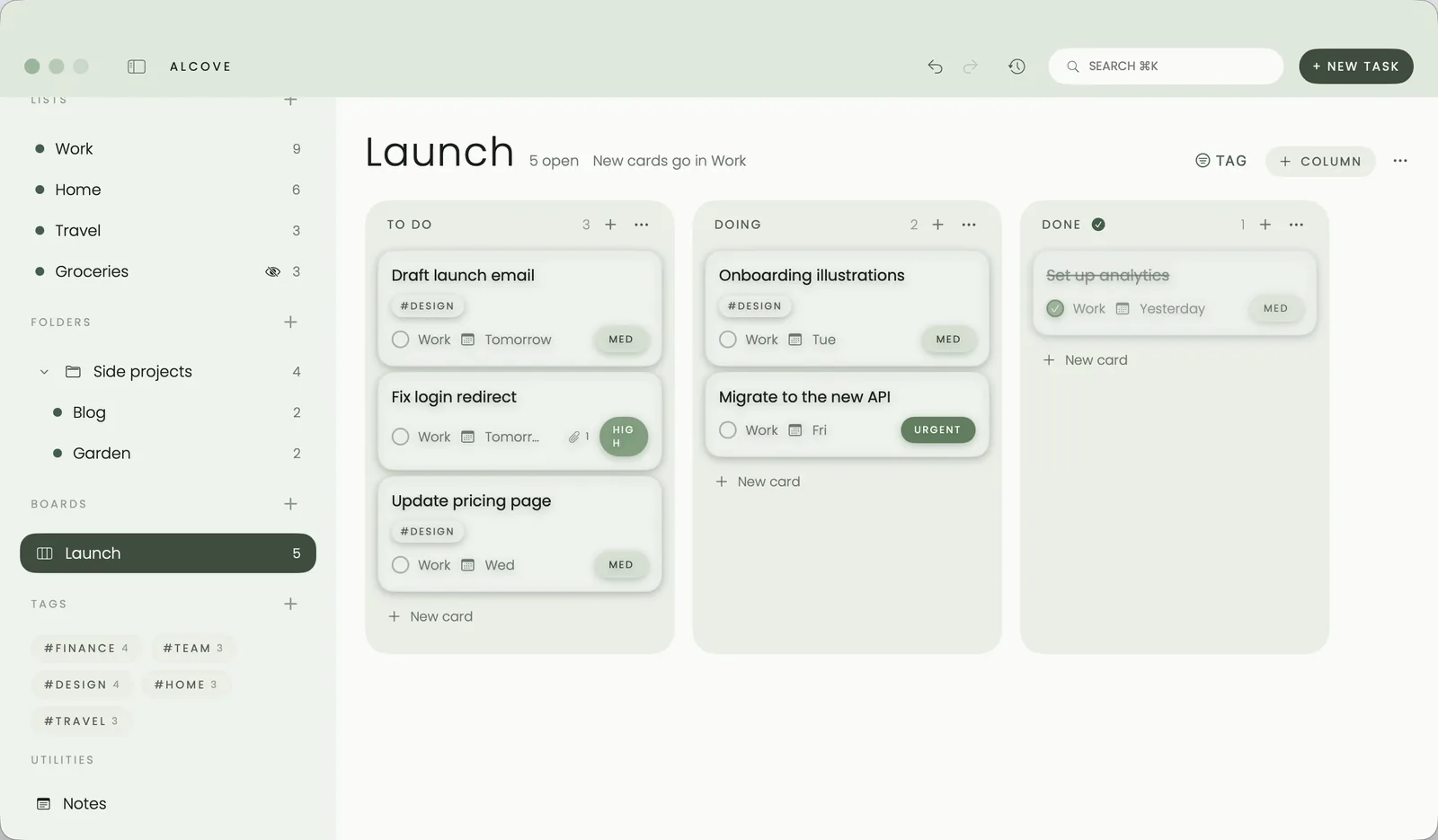
In Alcove a board is a layout, not a separate place. Make a board and it starts with To do, Doing and Done; rename, add or reorder columns as you like. Add cards from the board, or put any existing task on it. Each card stays in its list, shows up in Today when it's due, and turns up in search.
Mark a column as the done column and a card dropped there is completed everywhere; drag it back out and it reopens. Delete a board and nothing is lost: every task stays where it was. Boards work on Mac, iPhone and iPad, from the Mac menu bar, and in a floating window that stays above your other apps. See a personal kanban board in Alcove.
Best for: people who want boards and lists to be the same tasks, without a subscription.
Kan Do: boards for $2.99
Kan Do is a kanban app for every Apple device, from Mac to Apple TV, for $2.99 once. It has boards with columns, rich notes with checklists and attachments, smart lists such as Today and Upcoming, widgets, Siri and private iCloud sync.
Best for: boards first, on a small budget.
Apple Reminders: free columns
Since iOS 17 and macOS Sonoma, Reminders can split a list into sections and show it as columns. Drag reminders between columns to move them along. It's free and already on your devices, but each list is one board, and moving a reminder into a "Done" column doesn't complete it.
Best for: trying kanban without installing anything.
TickTick and Todoist: kanban as a view
Both apps let you show a list or project as a board on every platform, with sharing. TickTick includes kanban in its free plan; Todoist calls it the board layout.
Best for: boards across Windows, Android and Apple devices, or shared with others.
Trello: boards built for teams
Trello made kanban boards mainstream. It's strongest when several people share a board, with cards, checklists, due dates and power-ups. For a solo to-do list it can feel like more than you need.
Best for: shared boards.
Tips for a personal board that works
- Keep three to five columns. To do, Doing and Done is enough to start.
- Limit Doing. Two or three cards at most. If Doing is full, finish something first.
- Make cards small. "Write the intro" moves; "Write the report" sits in Doing for a week.
- Let Done be your record. In Alcove, cards in the done column are completed tasks, so they also show in your Done list and in Progress, where you can see what you finished this week.
Sources
Checked in October 2026:
- Kan Do
- Reminders on Mac: lists and columns, Apple Support
- TickTick Premium and free plan
- Todoist pricing
- Trello
Questions people ask
What is personal kanban?
Personal kanban is a way of managing your own work on a board. Each task is a card, columns show its stage (such as To do, Doing and Done), and you limit how many cards sit in Doing so you finish things before starting more.
Can Apple Reminders do kanban?
Yes, roughly. Since iOS 17 and macOS Sonoma you can add sections to a list and show it as columns, then drag reminders between them. There's no done column that completes a reminder, and each list is its own board.
Is there a kanban app with no subscription for Mac and iPhone?
Kan Do is $2.99 once for every Apple device, and Alcove is $29.99 once for Mac, iPhone and iPad with boards, lists, a calendar and notes. Apple Reminders is free.
Do the tasks on a board also appear in my normal lists?
In Alcove, yes. A board is a layout of your tasks, not a separate place: each card stays in its list, in Today and in search, and deleting a board keeps every task.
Which kanban app is best for sharing a board?
Trello is built for shared boards, and TickTick and Todoist share projects too. Alcove and Kan Do are built for one person.